
I put Claude Code in a browser terminal I built in Go
May 3, 2026•6 min read
I built a browser-based terminal in Go using godom and xterm.js. Then I ran Claude Code inside it. It just worked.
On this page 6 sections
TL;DR
- I built a browser-based terminal in Go as an example for godom: real PTY, real shell, rendered via xterm.js in the browser.
- Then I ran Claude Code inside it. It just worked. No tweaks, no flags, no special handling.
- This is also accidentally a really nice way to use a remote machine over Tailscale: scan a QR code, get a terminal in your phone’s browser, and your dotfiles are already there.
The “wait, what?” moment
The terminal example in godom is one of those things I built to test the framework. The pitch is simple: spawn a real shell with a real PTY, pipe its raw I/O to a browser, and let xterm.js render it. Around 250 lines of Go and a ~60-line JS adapter.
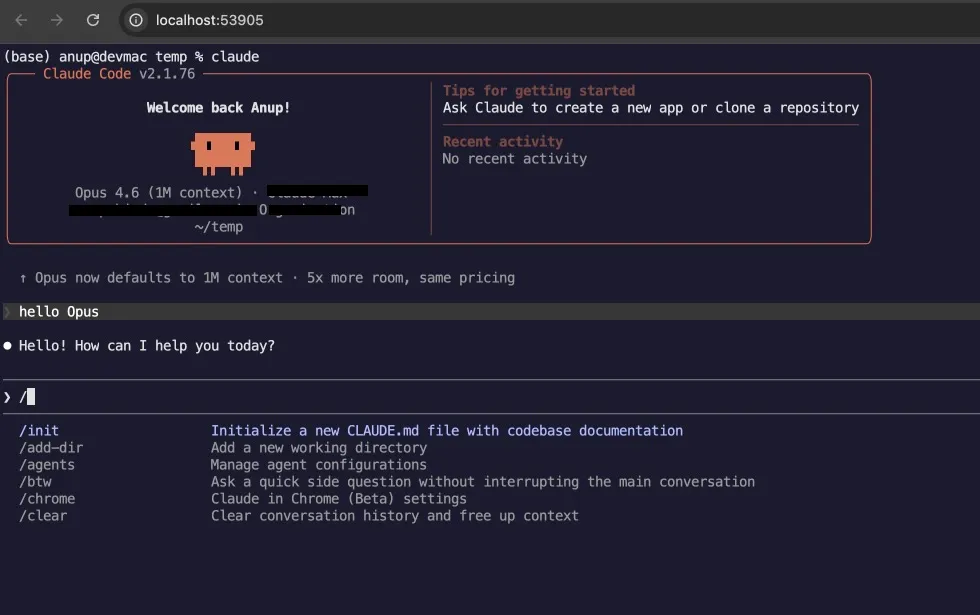
It worked. So I did the natural next thing: I typed claude into it.
The Claude Code welcome screen rendered. Colors, cursor, and the slash-command picker all worked (the screenshot above is exactly that). From Claude Code’s perspective, the PTY is real, $TERM is xterm-256color, the shell is the user’s actual shell, and the only thing different is which process is reading the PTY’s output and painting pixels.
That’s the whole bit. The browser is the screen. Everything else is normal.
How it actually works
There are three moving parts.
1. A real shell with a real PTY, in Go.
cmd := exec.Command(ts.shell)
cmd.Env = append(os.Environ(), "TERM=xterm-256color")
ptmx, err := pty.Start(cmd)
creack/pty handles the pseudo-terminal allocation. The shell is whatever $SHELL says it is. The PTY is the standard Unix kind; everything that depends on isatty() and ANSI escape codes will Just Work.
2. A WebSocket that pipes raw I/O.
Binary messages from browser to Go are keystrokes (raw bytes, not even text). Binary messages from Go to browser are PTY output. Text messages are reserved for control commands (resize):
if msgType == websocket.TextMessage {
    var resize struct {
        Cols int `json:"cols"`
        Rows int `json:"rows"`
    }
    if json.Unmarshal(data, &resize) == nil {
        ts.resize(resize.Cols, resize.Rows)
    }
} else {
    ts.writeToPTY(data)
}
This is intentionally separate from godom’s own WebSocket. The terminal example brings its own raw WebSocket on its own port, with its own auth token, because raw PTY I/O has nothing to do with godom’s tree-diff protocol. godom serves the page and authenticates; the terminal handles its own data plane.
3. xterm.js, wrapped in a tiny godom plugin.
godom.register("xterm", {
    init: function(el, data) {
        var term = new Terminal({ /* ...config... */ });
        var fitAddon = new FitAddon.FitAddon();
        term.loadAddon(fitAddon);
        term.open(el);
        fitAddon.fit();

        var ws = new WebSocket("ws://" + location.hostname + ":" + data.wsPort + "/terminal?token=" + encodeURIComponent(data.token));
        ws.binaryType = "arraybuffer";

        ws.onmessage = function(evt) { term.write(new Uint8Array(evt.data)); };
        term.onData(function(input) { ws.send(new TextEncoder().encode(input)); });
        term.onResize(function(size) { ws.send(JSON.stringify(size)); });
    },
    update: function(el, data) {}
});
That’s it. The plugin is the entire JS surface. xterm.js does all the terminal emulation: ANSI parsing, color, cursor positioning, scroll buffer, mouse selection. The Go side does none of that.
The HTML side is a single godom directive on a <div>:
<div g-plugin:xterm="Terminal"></div>g-plugin:xterm="Terminal" says: take the Terminal field from the Go struct (the WebSocket port and token), and hand it to the registered xterm plugin. That’s the entire wire-up.
The bits that surprised me
Three things turned out nicer than I expected.
Multi-tab is free. Open the terminal app in two browser tabs. They both attach to the same PTY session. Type in one, it shows up in the other. This is just because the Go server keeps a list of connected WebSocket clients and broadcasts PTY output to all of them. I didn’t write multi-tab code; it’s the same architectural property that gives godom its “multi-tab sync” thing in general.
Session survives the tab. Close the browser. Open it again. The shell is still running, your vim is still open, your htop is still updating. The PTY belongs to the Go process; the browser is just the screen. Closing the screen doesn’t close the shell.
Shell respawn. When you type exit, instead of the app crashing or showing a useless dead terminal, the Go process catches the EOF, prints a friendly “shell exited, starting new session” message, and spawns a new one. You’re never accidentally stuck staring at a dead terminal. To actually exit, close the tab or kill the Go process.
n, err := ptmx.Read(buf)
if err != nil {
    msg := []byte("\r\n\x1b[1;33m[shell exited, starting new session...]\x1b[0m\r\n")
    // broadcast to all clients
    ptmx.Close()
    ts.spawn()
    return
}
These aren’t features anyone explicitly needs in a “browser terminal” demo. But they push the example from “neat, that works” into “hold on, this is actually useful.”
Where it stops being a demo and starts being useful
godom binds to localhost by default. Set GODOM_HOST=0.0.0.0 and the terminal becomes accessible on your local network. Combine that with Tailscale, and you have an end-to-end-encrypted terminal accessible from any device on your tailnet, on any browser, with no SSH client.
godom prints a QR code to its own startup output. Scan it from your phone. Now you have a terminal on your dev machine, in your phone’s browser, with your dotfiles, your shell, your tools.
I’m not pretending this replaces SSH for serious use. SSH has decades of hardening; my few hundred lines of Go don’t. But for a personal lab box, a home server, or an in-progress project on another machine, it’s a one-binary solution that’s hard to beat for ergonomics.
Caveats, because anyone shipping this should hear them
- This thing gives anyone with the auth token full shell access to the host machine. Treat it like an unlocked terminal session.
- The token is sent in cleartext over HTTP. Use Tailscale or any VPN if you’re not on localhost. Do not put this on the public internet.
- I built this as a godom example, not a hardened product. If you want a hardened browser shell, projects like ttyd and GoTTY exist and have had real eyes on them.
If you stay in localhost or in your tailnet, the practical risk is roughly “the same as already being logged into your laptop.” Outside of that, don’t ship this without thinking hard.
Why I keep coming back to this example
The terminal is the example I show people when they ask what godom is for. Because it isn’t really a UI framework for buttons and forms. It’s a framework for the case where Go has the source of truth and the browser is just a screen.
A terminal is the limit version of that. There’s no UI state in Go beyond “what’s the WebSocket port and token.” Everything else, the entire visual experience, is xterm.js consuming raw bytes from a PTY. godom’s job is to serve the page, auth the user, and hand the plugin a small piece of config. The actual app is the PTY.
Same idea works for a video player (Go decodes via ffmpeg, browser is a <canvas>), a 3D renderer (Go does the math, browser draws 2D primitives), a charting dashboard (Go pushes numbers, Chart.js draws). The recipe is consistent: own the data and the work in Go, treat the browser as a thin rendering surface, use a small plugin to bridge to whatever JS library you need.
If you want to try it yourself, the godom repo has the example at examples/terminal/. Clone, go run ./examples/terminal, get a tab. Then type claude and watch your AI write code for you, in a terminal, in a browser, that you also wrote in Go. The whole thing is recursive in a way that still makes me smile.