
Breakout, with my phone as the paddle
May 8, 2026•5 min read
A breakout game built on godom: laptop renders the game, phone is the paddle controller via gyroscope, both connected to the same Go process.
On this page 7 sections
TL;DR
- I built breakout as a godom example. The laptop renders the game. The phone is the paddle controller.
- Tilt the phone left or right and the paddle moves. The gyro is read in the browser, sent to Go through a hidden input bound with
g-bind, and Go owns the game state. - It’s a demo, not a product: I tested on Android Chrome with a manual gyroscope permission grant. The architecture is the thing worth keeping.
The premise
Once I noticed godom’s multi-tab sync working (open two tabs, type in one, the other updates), the obvious follow-on was: those tabs don’t have to be on the same machine. Different devices, same Go process, same state.
Breakout was the toy I built to try that out. The laptop is the screen with the full game render: paddle, ball, brick rows. The phone is the controller with start, pause, and a gyroscope that moves the paddle when you tilt the device.
Both devices connect to the same Go binary. There’s no app to install on the phone, no Bluetooth pairing, no app store. You navigate to /controller on your phone’s browser and the controls are there.
What’s on the screens
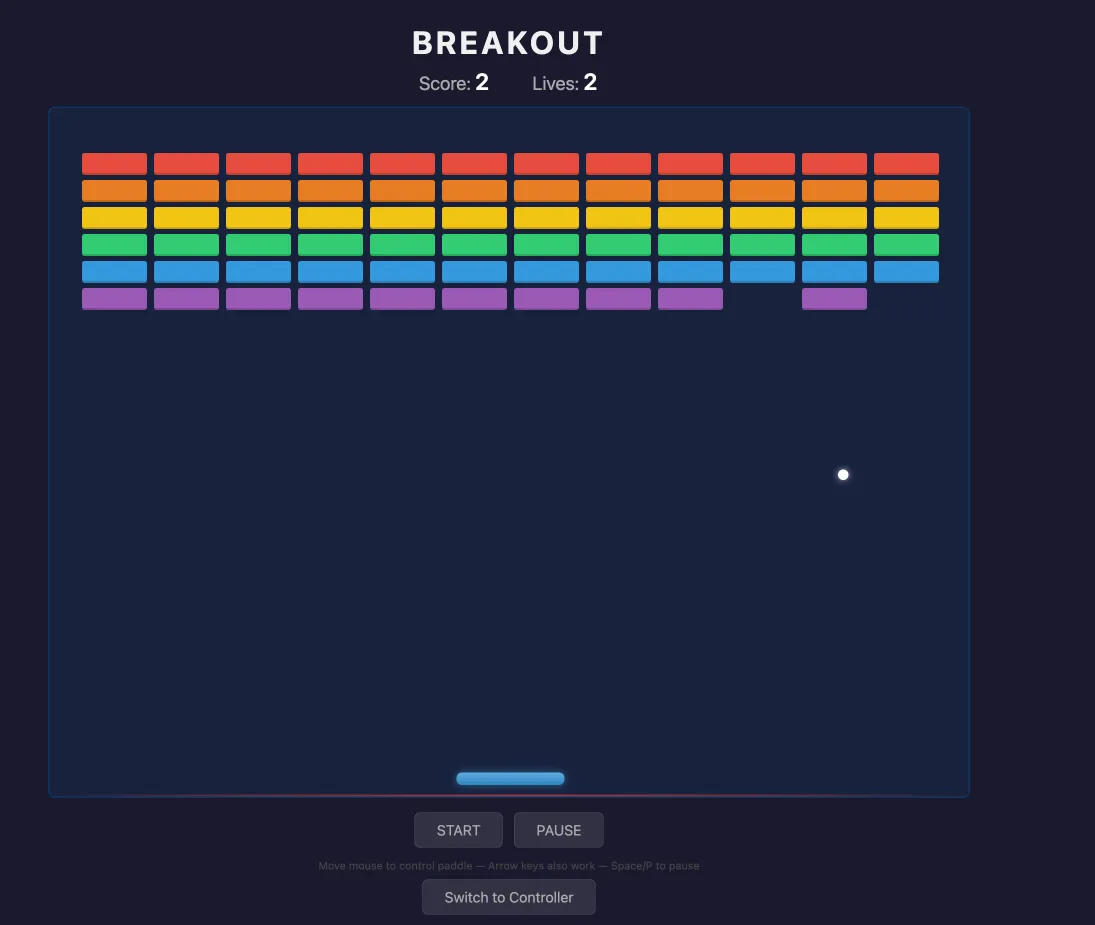
The featured image up top is the play view: the laptop’s tab, with the brick rows, the score, and the paddle.
The controller view, opened on a phone in landscape, looks like this:
It looks like a real game controller because the page is purpose-built for that role. There’s no game render on this page; the only job here is input. The arrows nudge the paddle in steps, the buttons control game state, and the GYRO button toggles tilt input on or off.
Turn the gyro on (you’ll need to grant the URL the motion-sensor permission in your phone’s browser settings first; see the caveats below) and hold the phone sideways. The controller’s layout rotates with you. You get a horizontal tilt indicator at the top and the buttons underneath:
How the pieces fit
Three of the four islands in the binary share the same *GameState via an embedded pointer:
PlayViewdrives the game render and mouse-paddle on the laptop.ControllerViewdrives the phone’s controller UI.StatusViewdrives the small status bar at the top of every page.
Because the islands embed the same pointer, mutating any field of GameState in one island auto-refreshes the others. godom watches for shared embedded pointers at registration time and broadcasts to siblings on every render the framework runs (after a method call, after a bound input change, or after a background Refresh() from a goroutine). There are no cross-island callbacks to wire up; the shared pointer is the wire.
The page layout uses ordinary Go: net/http for routing, html/template for the page chrome, //go:embed for the static assets. godom is mounted into that, not running it. / is the menu, /play is the game, /controller is the paddle UI, /scores is the scoreboard.
Game logic lives in Go: 360 lines of game.go for physics, brick collision, ball update, life tracking, all running on a ticker.
The gyro plumbing
The gyro is the one place that needs a small JS bridge, and I tried to keep even that minimal.
gyro.js listens for deviceorientation events, picks the right axis based on whether the phone is in portrait or landscape, throttles to one update per animation frame, and writes the tilt value to a hidden <input id="gyro-input" g-bind="Tilt">. From there, godom’s regular input-sync layer carries the value back to Go, exactly like any other bound input.
input.value = lastVal;
input.dispatchEvent(new Event("input", {bubbles: true}));
That was the trick I liked. Instead of inventing a new bridge for gyro events, I reused the g-bind plumbing godom already has for ordinary <input> elements. From godom’s side, the phone’s tilt is just an input value being updated several times a second. The bridge stayed dumb.
On the Go side, Tilt is a struct field. The game reads it on every tick and adjusts the paddle position. No special handlers, no custom dispatcher; the field just has the latest value the phone reported.
Honest caveats
This is a demo. The honest list:
- Android Chrome only in my testing. I ran it on a single Android phone using Chrome. The gyro plugin wires up
DeviceOrientationEvent.requestPermission()on atouchstartlistener for iOS, but I haven’t validated the iOS path on an actual device. - You have to grant the gyro permission for the URL in your phone’s browser before any of this works. Motion-sensor access isn’t on by default, even on Android Chrome. I had to open the per-URL site settings on the phone, find the motion-sensors permission, and turn it on for the breakout URL specifically. It’s tedious; the gyro is dead until you do it. A real product would build a proper in-page permission flow. This is an experiment, so the bookkeeping is on the user.
- No latency tuning. It feels good on a local network. I haven’t tested it across a worse link. Don’t extrapolate from “it works on my LAN” to “this is a real game over the open internet.”
Where this could go
The interesting thing about phone-as-controller isn’t breakout. Breakout is the toy. The interesting thing is that it’s almost trivially extensible.
Replace “tilt the phone, paddle moves” with “tilt the phone, Go sends virtual keystrokes to the host OS.” Now the phone is a controller for any game running on the laptop, not just one godom built. Race games. Flight simulators. Anything that takes WASD or arrow keys. I didn’t go that far in this demo, but the same architecture (phone in browser, Go has the state, virtual input layer downstream) would support it.
You can flip it the other way too: phone is the screen for something the laptop is rendering. Or both devices contribute different input modalities to one shared simulation. Once Go owns the state, the choice of which device runs which view is just a deployment detail.
Where to look
The example is at examples/breakout-game/ in the godom repo. Multi-page setup with four islands (three of them sharing *GameState), the gyro plugin, sound effects, scoring, the lot. One Go binary. Run it, open the play view on your laptop, navigate to /controller on your phone, grant the motion-sensor permission, and tilt.