
AI Agent That Asks Before Acting in Python - Building Agents Part 3
August 31, 2025 • 6 min read
Build a Clarifying Agent in Python with GPT-5 that asks follow-up questions until inputs are clear, providing a safer, smarter, and user-friendly experience.
Introduction: Why We Need Clarifying Agents
In Part 1 , we built a Simple Decision-Making Agent that worked on structured inputs.
In Part 2 , we added an LLM “perception layer” that turns natural language into structured JSON using response_format + json_schema.
But there’s still a problem:
User: “I’m kinda hungry and I don’t have much time.”
How hungry is “kinda”? Is “not much time” five minutes or fifteen?
Rather than guessing, a good agent asks clarifying questions until everything is clear and understood.
NOTE: This article builds directly on Part 2: LLM-Powered Agent , and we’ll be referring back to it often. So if you haven’t read it yet, we recommend starting there.
Enter the Clarifying Agent
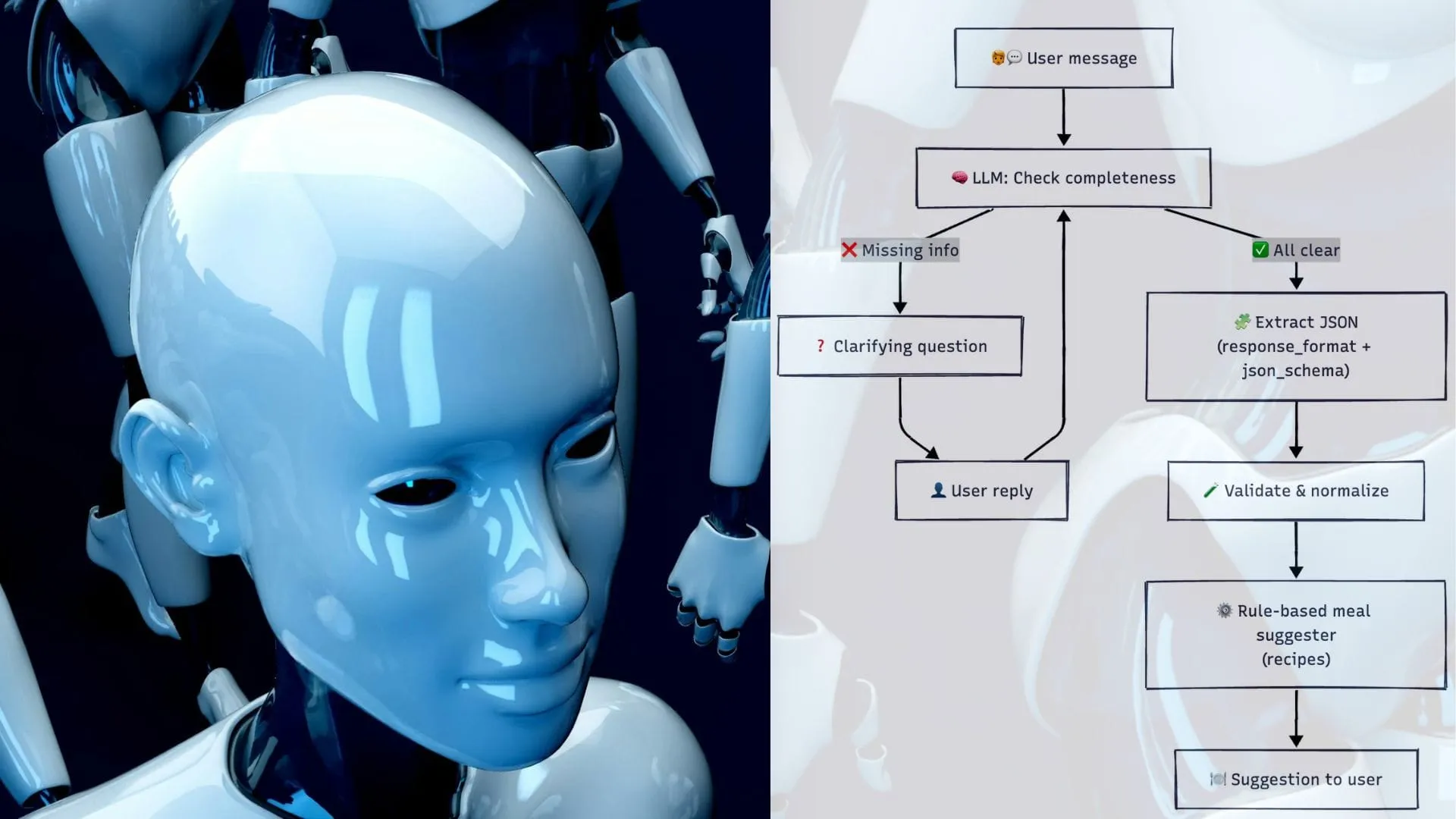
Our agent will:
- Detect what’s missing or vague (ingredients, hunger 1–5, time in minutes).
- Ask one clarifying question at a time.
- Loop until all three fields are complete.
- Only then, extract structured JSON (with the same schema approach as Part 2 ).
How the Clarifying Agent Works
Environment Setup
Following the same baseline as Part 2 , and similar to it, we’ll load the environment from a .env file for convenience.
python3 -m venv ~/.venvs/agents
source ~/.venvs/agents/bin/activate
pip install -U openai python-dotenv
Create a .env file:
OPENAI_API_KEY=sk-...And load it in Python:
from dotenv import load_dotenv
load_dotenv()  # loads OPENAI_API_KEY from .env
Code: Clarifying Agent with Schema-Constrained Extraction
Below is a safe, production-friendly implementation that:
- Uses a
<DONE/>sentinel to avoid false “done” matches inside natural text. - Caps clarifications with
max_roundsto prevent infinite loops. - Extracts JSON via
response_format={'type':'json_schema'}with the same schema as Part 2 . - Validates types/ranges and normalizes inputs.
1) Shared JSON Schema (same as Part 2)
MEAL_SCHEMA = {
    "type": "object",
    "properties": {
        "ingredients": {"type": "array", "items": {"type": "string"}},
        "hunger": {"type": "integer", "minimum": 1, "maximum": 5},
        "time": {"type": "integer", "minimum": 0}
    },
    "required": ["ingredients", "hunger", "time"],
    "additionalProperties": False
}
2) Rule Engine + Tiny Recipe Base
from dataclasses import dataclass
from typing import List

def normalize_items(items: List[str]) -> List[str]:
    return [i.strip().lower() for i in items]

@dataclass
class MealAgent:
    ingredients: List[str] = None
    hunger: int = 0
    time: int = 0

    def __post_init__(self):
        # Use your recipe list
        self.recipes = [
            {
                "name": "Egg Fried Rice",
                "ingredients": ["rice", "eggs"],
                "time": 15,
                "filling": 4
            },
            {
                "name": "Cheese Omelette Sandwich",
                "ingredients": ["bread", "cheese", "eggs"],
                "time": 10,
                "filling": 5
            },
            {
                "name": "Bread and Jam",
                "ingredients": ["bread", "jam"],
                "time": 5,
                "filling": 2
            }
        ]

    def perceive(self, ingredients: List[str], hunger: int, minutes: int):
        self.ingredients = normalize_items(ingredients)
        self.hunger = int(hunger)
        self.time = int(minutes)

    def act(self) -> str:
        have = set(self.ingredients)

        # Only requirement: recipe "need" ⊆ user "have"
        # (extra ingredients like "vegetables" are ignored)
        feasible = []
        for recipe in self.recipes:
            need = set(map(str.lower, recipe["ingredients"]))
            if need.issubset(have) and recipe["time"] <= self.time:
                feasible.append(recipe)

        if feasible:
            # If very hungry, prefer higher filling; otherwise prefer quicker
            feasible.sort(key=lambda r: (-(r["filling"] if self.hunger >= 4 else 0), r["time"]))
            top = feasible[0]
            tag = " (quick & filling!)" if self.hunger >= 4 and top["filling"] >= 4 else ""
            return f'{top["name"]}{tag}'

        return "No suitable recipe found."
3) Clarifying + Extraction
import json
from typing import List, Callable
from openai import OpenAI
from dotenv import load_dotenv

load_dotenv()
client = OpenAI()

class ClarifyingMealAgent:
    def __init__(self, ask_user=input, max_rounds=8):
        self.ask_user = ask_user
        self.max_rounds = max_rounds
        self.ingredients: List[str] = []
        self.hunger: int = 0
        self.time: int = 0

    def clarify_until_clear(self, user_input: str) -> str:
        convo = user_input.strip()
        rounds = 0
        while True:
            rounds += 1
            if rounds > self.max_rounds:
                print("⚠️ Too many clarification rounds. Proceeding with best effort.")
                return convo

            prompt = f'''
You are helping extract three fields from a user's cooking context:
1) ingredients (list of items). (list[str]): Canonical ingredient names only, pluralized where natural.
2) hunger (integer 1-5)
3) time (integer minutes)
• Remove numbers (e.g., "2 eggs" → "eggs")
• Remove adjectives (e.g., "leftover rice" → "rice", "boiled egg" → "eggs")
• Use simple grocery-style labels that match common recipes.

Do NOT infer missing values; if anything is vague or missing, ask a direct question to get that exact value.

Conversation so far:
--- START ---
{convo}
--- END ---

If ALL THREE are present and clear, reply with:
<DONE/>

If NOT complete, ask ONE clarifying question about the most missing/unclear field. No extra commentary.
'''
            reply = self.ask_gpt(prompt).strip()
            if "<DONE/>" in reply:
                return convo
            print("🤖 Clarifying:", reply)
            user_reply = self.ask_user("👤 Your answer: ").strip()
            convo += "\n" + reply + "\n" + user_reply

    def perceive(self, user_input: str) -> None:
        full = self.clarify_until_clear(user_input)

        resp = client.chat.completions.create(
            model="gpt-5",
            messages=[
                {"role": "system",
                    "content": (
                        "Extract meal inputs as JSON matching the schema. "
                        "Normalize 'ingredients' to these allowed labels ONLY: "
                        "rice, eggs, bread, cheese, jam, vegetables. "
                        "Remove quantities (e.g., '2 eggs' -> 'eggs') and adjectives "
                        "(e.g., 'leftover rice' -> 'rice', 'boiled egg' -> 'eggs'). "
                        "Map synonyms like 'veg'/'veggies' -> 'vegetables'. "
                        "Return only canonical grocery-style labels."
                    )
                },
                {"role": "user", "content": full},
            ],
            response_format={
                "type": "json_schema",
                "json_schema": {"name": "meal_inputs", "schema": MEAL_SCHEMA},
            },
        )
        raw = resp.choices[0].message.content
        data = json.loads(raw)

        ingredients = data.get("ingredients", [])
        hunger = int(data.get("hunger", 0))
        minutes = int(data.get("time", 0))
        if not isinstance(ingredients, list) or not ingredients:
            raise ValueError("ingredients must be a non-empty list of strings.")
        if hunger < 1 or hunger > 5:
            raise ValueError("hunger must be an integer 1..5.")
        if minutes <= 0 or minutes > 24*60:
            raise ValueError("time must be a positive integer (minutes).")

        self.ingredients = [str(i).strip().lower() for i in ingredients]
        self.hunger = hunger
        self.time = minutes

    def ask_gpt(self, prompt: str) -> str:
        r = client.chat.completions.create(model="gpt-5", messages=[{"role":"user","content":prompt}])
        return r.choices[0].message.content
Why “Do NOT infer” (vs Part 2):
In Part 2 , we let the model guess vague details (e.g., treating “in a rush” as 10 minutes). That’s convenient for demos, but risky. Guesses can be wrong, inconsistent across runs, and hard to explain to users. In this part, the clarify loop flips this: ask, don’t guess. If the user says “kinda hungry” or “not much time,” the agent asks a single, direct question to pin down the exact number.
What this buys you:
You receive reliable, user-confirmed inputs before any decision logic is executed, which enhances trust and reduces silent errors. It also ensures stable behavior for testing/telemetry, and maintains the integrity of schema extraction; no backfilling or hallucinated values. In short: clearer inputs, fewer surprises, better UX.
4) Wire it up
if __name__ == "__main__":
    clarifier = ClarifyingMealAgent()
    meal = MealAgent()

    user_text = "I have leftover rice, two eggs, and veggies. I am kinda hungry and in a rush."
    clarifier.perceive(user_text)

    meal.perceive(clarifier.ingredients, clarifier.hunger, clarifier.time)
    suggestion = meal.act()
    print("🍽️ Suggestion:", suggestion)
Sample Run
Input:
I have leftover rice and two eggs, and veggies. I’m kinda hungry and in a rush.
Output:
🤖 Clarifying: How many minutes do you have to cook?
👤 Your answer: 15
🤖 Clarifying: On a scale of 1–5, how hungry are you?
👤 Your answer: 4
🍽️ Suggestion: Egg Fried Rice (quick & filling!)
Why <DONE/> and max_rounds?
<DONE/>sentinel: the plain word done can appear in conversation (“I’m done cooking”). A unique tag reduces false positives, so the loop only exits on an explicit signal from the LLM.max_rounds: guards against infinite loops if a user goes silent or keeps replying vaguely. After N tries, the agent proceeds with best effort or shows a graceful message.
Why This Is Better
- Matches Part 2's schema-constrained output pattern for reliable JSON.
- Adaptive: asks only what’s missing; feels conversational.
- Safe: bounded loop + validated inputs.
- Practical: plugs straight into the Part 1 rule engine + recipes for instant results.
Wrap-Up
This finishes the 3-part series: rules → LLM perception → clarifying loop. From here, you can add memory (favorite meals), tools (web recipe fetchers), or a UI layer.