
A video player that decodes frames in Go
May 7, 2026•6 min read
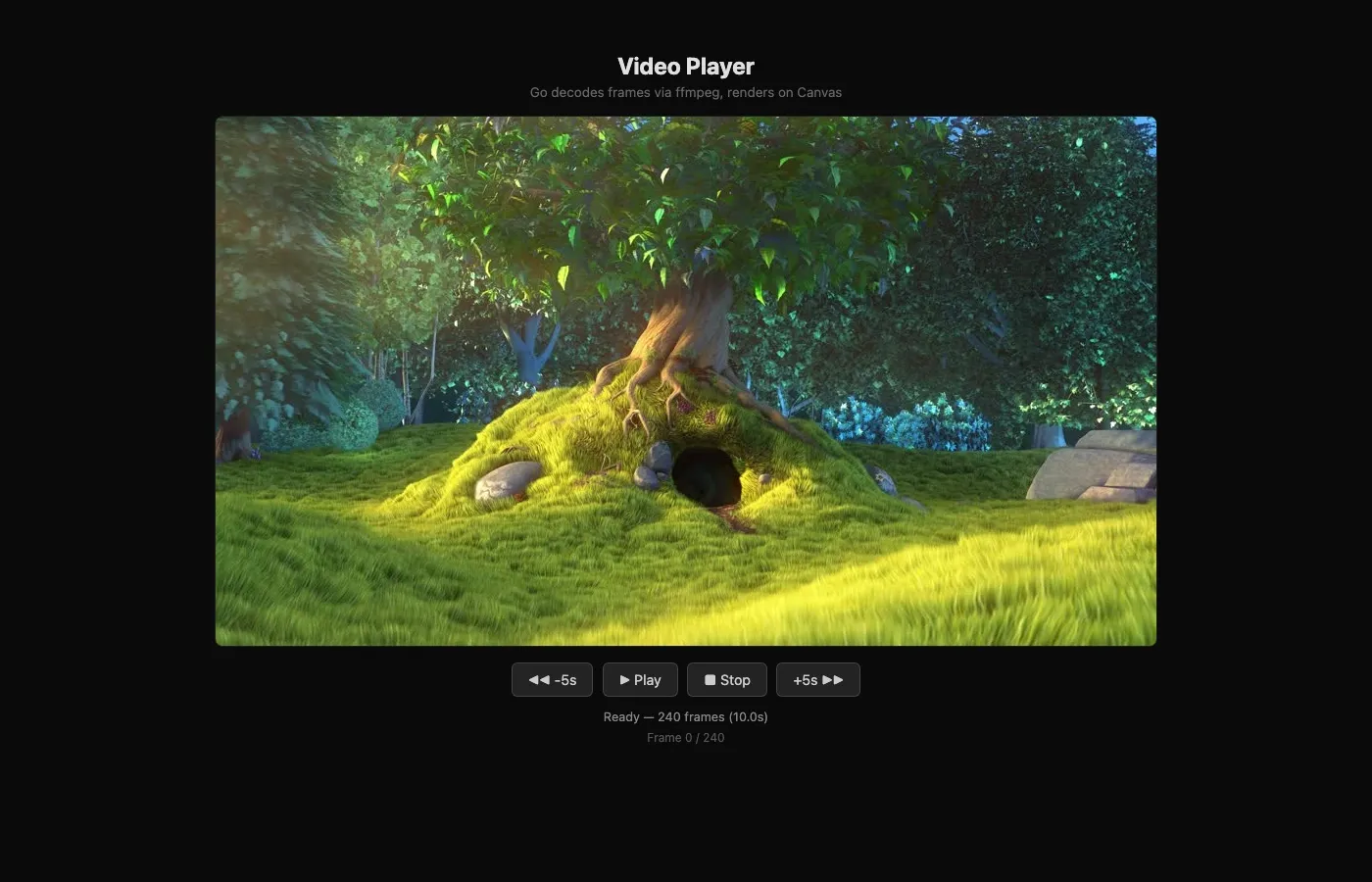
Go shells out to ffmpeg, decodes a video into JPEG frames, sends them to a browser canvas. No HTML video tag, no streaming, no codecs in the browser.
On this page 6 sections
TL;DR
- I built a video player as an example in godom. It plays an
.mp4on a<canvas>element. No<video>tag. - Go shells out to
ffmpeg, decodes the video into JPEG frames at 24fps, holds them in memory, and sends one base64-encoded frame at a time to the browser. - The browser plugin is a tiny JS file that decodes a JPEG and calls
drawImage. That’s the entire client.
Why bother, when <video> exists
The browser already has a video element. It handles MP4, WebM, HLS, all the codecs, all the buffering, the scrubbing UI, fullscreen, all of it. If you want to play a video on a webpage, <video> is the right answer.
So why decode the video myself?
Because I’m not actually trying to play a video. I’m trying to prove a point about godom: the Go process owns the work, the browser is just a screen. A video player is a fun stress test for that idea, because video is the kind of thing the browser is very good at. If the browser can be reduced to a dumb canvas and Go can do the actual work and the result still looks smooth, the architecture works.
There’s also a side benefit: once Go has the bytes of every decoded frame, anything you might want to do with them (per-frame transforms, custom seeking, computer-vision passes) is a Go function away. The <video> element is a black box; Go holding the frames is a workshop.
The pipeline, end to end
1. Shell out to ffmpeg.
cmd := exec.Command("ffmpeg",
    "-i", a.videoSrc,
    "-vf", fmt.Sprintf("fps=%d,scale=%d:%d:force_original_aspect_ratio=decrease,pad=%d:%d:(ow-iw)/2:(oh-ih)/2",
        targetFPS, canvasWidth, canvasHeight, canvasWidth, canvasHeight),
    "-f", "image2pipe",
    "-c:v", "mjpeg",
    "-q:v", "5",
    "-an",
    "pipe:1",
)
ffmpeg is doing all the actual decoding. The flags say: take the input video, downsample to 24fps, scale to my canvas size while preserving aspect ratio, pad with black bars, output as a stream of JPEG frames concatenated together (mjpeg, image2pipe), drop audio, send to stdout.
I am not writing a video decoder. I am writing a thing that uses a video decoder.
2. Read JPEGs out of the stream.
The output is a single stream of concatenated JPEGs. Each one starts with the SOI marker (0xFFD8) and ends with EOI (0xFFD9). So:
func readJPEGFrame(r *bufio.Reader) ([]byte, error) {
    // Find SOI
    for {
        b, err := r.ReadByte()
        if err != nil { return nil, err }
        if b == 0xFF {
            b2, _ := r.ReadByte()
            if b2 == 0xD8 { break }
        }
    }
    buf := []byte{0xFF, 0xD8}
    for {
        b, err := r.ReadByte()
        if err != nil { return buf, err }
        buf = append(buf, b)
        if b == 0xFF {
            b2, _ := r.ReadByte()
            buf = append(buf, b2)
            if b2 == 0xD9 { return buf, nil }
        }
    }
}
Read until SOI. Read bytes until you see EOI. Hand back the buffer. That’s a JPEG. Repeat.
There’s no reason to round-trip through Go’s image package: ffmpeg already gave me well-formed JPEGs, and the browser decodes JPEGs natively.
3. Hold all the frames in memory.
This is the part that would horrify someone shipping this in production. I’m just appending each frame to a slice as I read it.
var frames [][]byte
for {
    frame, err := readJPEGFrame(reader)
    if err != nil || frame == nil { break }
    frames = append(frames, frame)
}
For a few-minute video at 24fps, that’s a few thousand frames at maybe 30KB each, so 100MB of memory or so. For a two-hour movie, it would be unhinged. But for the example, this is fine, and it makes the rest of the player trivial: every operation (play, pause, seek backward 5 seconds, jump to start) is just an index into a slice.
4. Send the current frame to the browser.
Every frame, while playing, the Go ticker:
a.Player = FrameData{
    Width:  canvasWidth,
    Height: canvasHeight,
    Frame:  base64.StdEncoding.EncodeToString(a.frames[idx]),
}
a.Refresh()
The browser-side plugin sees Player change, runs its update, and draws.
godom does the diff and the patch transport. From the Go side, this is just “set a struct field, call Refresh, repeat 24 times a second.”
5. A tiny browser plugin.
godom.register("videocanvas", {
    init: function(el, data) {
        el.width = data.width || 960;
        el.height = data.height || 540;
        el.__ctx = el.getContext("2d");
        if (data.frame) this._drawFrame(el, data);
    },
    update: function(el, data) {
        if (!el.__ctx || !data.frame) return;
        this._drawFrame(el, data);
    },
    _drawFrame: function(el, data) {
        var img = new Image();
        img.onload = function() {
            el.__ctx.drawImage(img, 0, 0, el.width, el.height);
        };
        img.src = "data:image/jpeg;base64," + data.frame;
    }
});
That is the entire client. There’s no buffer logic. No codec. No frame timing. The browser does what it’s good at (decode JPEG, paint to canvas) and nothing else.
Controls, in Go
Play, pause, stop, jump backward 5 seconds, jump forward 5 seconds. Each one is a method on the app struct:
func (a *App) PlayPause() { a.Playing = !a.Playing }
func (a *App) Stop()      { a.Playing = false; a.FrameNum = 0; a.showFrame(0) }
func (a *App) Forward()   { a.FrameNum = min(total-1, a.FrameNum + targetFPS*5); a.showFrame(a.FrameNum) }
func (a *App) Backward()  { a.FrameNum = max(0, a.FrameNum - targetFPS*5);       a.showFrame(a.FrameNum) }
The HTML is just buttons:
<button g-click="PlayPause" g-text="PlayLabel"></button>
<button g-click="Stop">Stop</button>
<button g-click="Backward">-5s</button>
<button g-click="Forward">+5s</button>
There’s no “video player state machine” anywhere in JavaScript. The browser doesn’t even know “playing” is a thing. From the browser’s perspective, a struct field changes, a new JPEG arrives, paint it. The rest is just buttons that fire methods.
The neat consequence: scrubbing is free
Once you’ve decoded the whole video into a slice of frames, jumping anywhere is a.frames[idx]. There’s no “seek the codec, decode forward to keyframe, decode forward to target.” Instant.
Multi-tab? Same as the rest of godom: open the player in two tabs, hit play, both tabs show the same frame at the same time, because both tabs are rendering whatever Go sent on the last frame. No work to do.
State across tab close? Close the browser, reopen it, you’re at the same frame, paused if you were paused, playing if you were playing. The Go process never lost track.
These are properties of “Go owns the state, browser is the screen,” again. They are not features I added.
What this is not
This is not a streaming video player. It loads the whole thing into memory before you can scrub. For a real product, you’d want partial decoding, frame caching by range, lazy loading from disk, the works.
This is not a substitute for <video>. The native video element is going to handle codecs, hardware acceleration, network buffering, and a hundred edge cases better than my pipeline ever will. If your goal is “show this MP4 to the user,” use <video> and move on.
What this is is a working demonstration that “frames computed in Go, drawn in the browser” is a real architecture, not a hand-wave. It’s the same shape as the solar system example (Go computes draw commands, browser draws), the same shape as the system monitor, the same shape as the browser terminal where xterm.js renders raw PTY bytes from Go.
The pattern, every time, is: the interesting work is in Go where I have types, tests, a debugger, and my actual mental model of the problem. The browser is a screen.
Where to look
The example is at examples/video-player/ in the godom repo. Three files: main.go (app, decode loop, ticker), video-bridge.js (the small plugin), and an HTML template.
You’ll need ffmpeg on your PATH. Run with:
go run ./examples/video-player -video /path/to/anything.mp4Watch a video play in a <canvas> instead of a <video> tag. It looks identical. It is, of course, not identical at all.