
When to write plain JS in godom (and when not to)
May 6, 2026•7 min read
godom doesn't ban JavaScript; it pushes it to the edges where it actually pays for itself. Three tiers, one rule, and the trap to avoid.
On this page 7 sections
TL;DR
- godom doesn’t ban JavaScript. It just makes most of it unnecessary.
- Three tiers, in order of preference: directives only, plain
<script>for browser-only effects, and a plugin when you want to mount a real JS library (Chart.js, xterm.js, ECharts, ApexCharts). - The rule that picks the tier: if Go owns the data, Go owns the logic that touches it.
- “I’ll just do this in JS for now” is the trap. State splits, the two sides drift, and the cleanup is more expensive than the original Go version would have been.
The previous post covered the composition surface. This one is about the JS surface, which is meant to be small.
godom’s pitch is that you don’t write a JS frontend. That’s not “no JS allowed.” Some things genuinely live in the browser. The framework’s job is to make the inside-Go path the obvious one and to leave well-marked off-ramps for the cases that don’t fit.
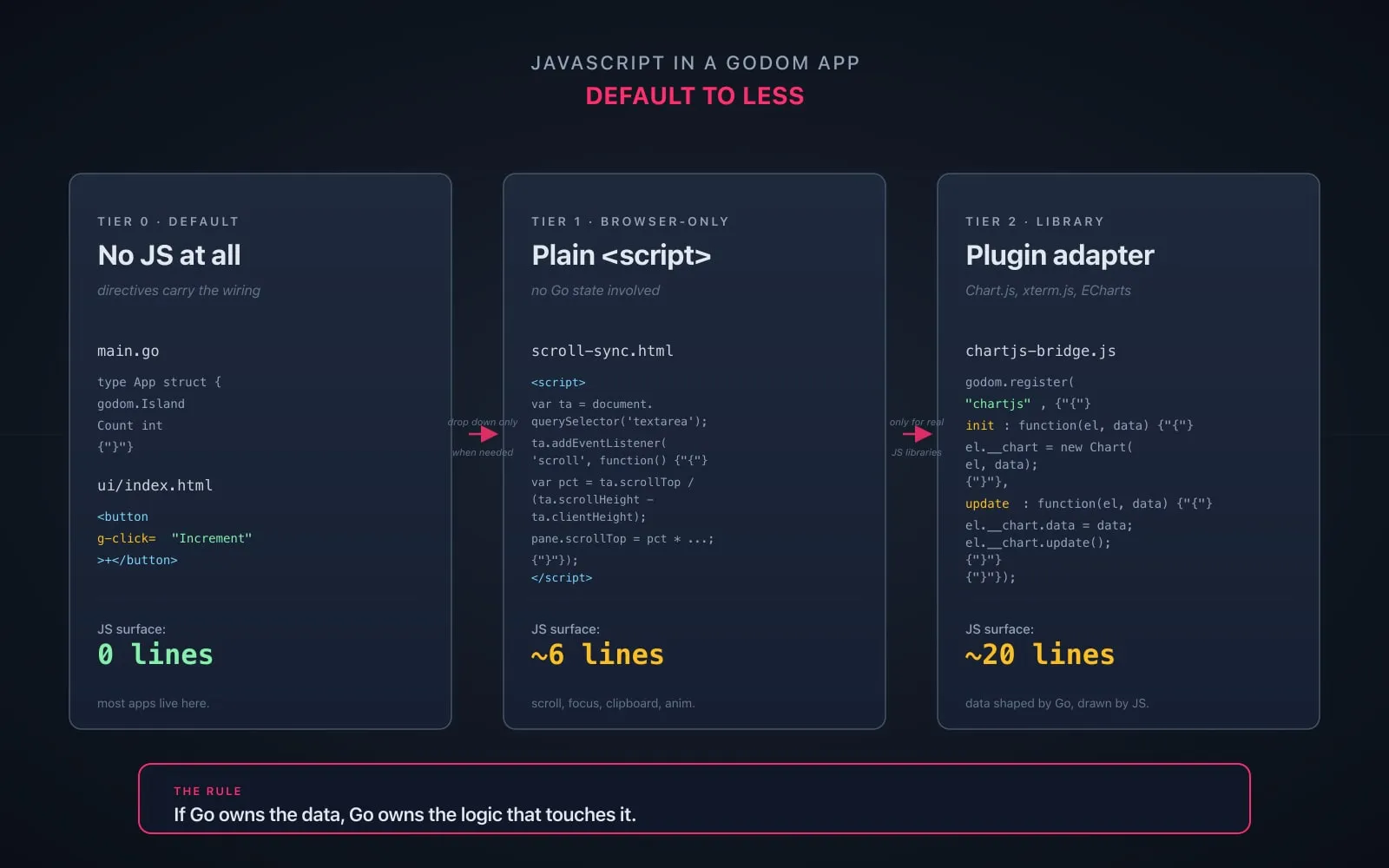
Tier 0: nothing. Let directives handle it
The default. Almost everything you’d reach for JS to do, godom directives already cover.
- Click a button:
g-click="Save" - Two-way bind an input:
g-bind="Email" - Toggle a class:
g-class:active="IsActive" - Show or hide:
g-show="HasErrors" - Loop:
g-for="todo, i in Todos" - Set a DOM property:
g-prop:scrollTop="ScrollPos" - Set innerHTML:
g-html="RenderedMarkdown()" - Listen for a key:
g-keydown="Enter:Submit"
These cover the standard event-and-state-update loop. The Go method is the source of truth, the directive is the wiring, and the bridge applies the result. There is no place for hand-written JS in any of these.
If you’re tempted to reach for a <script> to wire up a click handler or sync a form value, you’re skipping the framework. Don’t.
Tier 1: a plain <script> for browser-only effects
Some things the browser knows that Go does not. Live element dimensions. Scroll position relative to those dimensions. Focus. Clipboard. The pixel-level state of an animation in flight.
For these, a <script> tag in your template is the right answer. Zero round-trip. Zero state on the server. The script reads the DOM, mutates the DOM, done.
The canonical example in the repo is the markdown-editor example. It has a textarea on the left and a rendered preview on the right, and they stay scroll-synced. The honest comment sits in the example’s own README:
var ta = document.querySelector('textarea');
var pane = document.querySelector('.preview').parentElement;
ta.addEventListener('scroll', function() {
    var pct = ta.scrollTop / (ta.scrollHeight - ta.clientHeight || 1);
    pane.scrollTop = pct * (pane.scrollHeight - pane.clientHeight);
});
Six lines. Runs entirely in the browser. Zero latency.
The example actually ships the godom version (a g-scroll event going to a Go handler, then g-prop:_scrollratio carrying a ratio back) because the example is also a test of those directives. But the README is candid: for scroll sync specifically, plain JS is simpler and faster. Plain JS is the better tool when the job is “the browser needs to talk to itself about pixel state.”
Other good fits for tier 1:
- Programmatic focus after a transition (
element.focus()after a CSS animation). - Clipboard read/write (
navigator.clipboard.writeText(...)). - A short CSS animation that’s coordinated with a directive but doesn’t need Go to know about each frame.
- Reading a measurement that exists for a single instant and is never persisted.
Notice the shape: in every case, the data the script touches is browser-local and never wanted on the server. The moment Go would care, this isn’t tier 1 anymore.
Tier 2: a plugin, for a real JS library
The third tier is when you want to mount a library that already exists and that nobody is going to rewrite in Go. Chart.js. xterm.js. ECharts. ApexCharts. Plotly. Leaflet. CodeMirror.
godom’s plugin protocol is two functions. Your adapter calls godom.register(name, handler) with init(el, data) and update(el, data):
godom.register("chartjs", {
    init: function(el, data) {
        el.__chart = new Chart(el, {
            type: data.type,
            data: { labels: data.labels || [], datasets: data.datasets || [] },
            options: data.options || {}
        });
    },
    update: function(el, data) {
        var chart = el.__chart;
        if (!chart) return;
        chart.data.labels = data.labels || [];
        var ds = data.datasets || [];
        for (var i = 0; i < ds.length; i++) {
            if (chart.data.datasets[i]) {
                chart.data.datasets[i].data = ds[i].data || [];
            }
        }
        chart.update("none");
    }
});
That’s the whole adapter for Chart.js. init runs once, creates the library instance, stashes it on the element. update runs on every subsequent render and pushes the latest data into the existing instance. The framework JSON-serializes the bound Go field and hands it over.
In your template:
<canvas g-plugin:chartjs="CPUChart"></canvas>In your Go struct:
type App struct {
    godom.Island
    CPUChart chartjs.Chart
}
When CPUChart mutates and the island re-renders, the bridge sees a PatchPlugin and calls update(el, dataFromCPUChart). Your adapter calls chart.update(). No clear-and-rebuild, no flicker, no ID drift.
Two flavors of plugin:
- Local plugin. A
.jsfile embedded next to yourmain.go, registered witheng.RegisterPlugin("name", bridgeJS). Use this when the library is for one app. The repo hasexamples/charts-without-plugin/, which mounts ApexCharts with one inline bridge file: 15 lines of JS. - Plugin package. A Go package under
plugins/that exports aPluginFunc. Use this when you want a reusable, importable thing.plugins/chartjs/,plugins/plotly/,plugins/echarts/follow this pattern. The plugin can also embed the JS library itself (Chart.js’schart.min.jslives next to the adapter and gets injected on connect), so the consumer never adds a CDN tag.
The Chart.js plugin’s wiring code is short: two //go:embed directives, a PluginFunc value that calls eng.RegisterPlugin("chartjs", chartLibJS, bridgeJS), and a Go type for the chart config. The adapter is 21 lines of JS. That’s the entire surface area for “use Chart.js inside godom.”
The xterm.js terminal example is a similar story. ~60 lines of JS adapter, plus a separate raw-PTY WebSocket. The Go side spawns the PTY and passes raw bytes; the adapter renders them through xterm.js. Both sides do the part they’re good at. I covered that one in the browser-terminal post.
The rule
If Go owns the data, Go owns the logic that touches it.
That’s the whole rule. It collapses the three tiers into a single decision.
- “I want to update this field on click.” Go owns the field. Go owns the click. Tier 0,
g-click. - “I want to keep two scroll positions in sync.” Neither side owns the position; it’s a transient pixel measurement on the page. Tier 1, plain script.
- “I want a chart that shows server-side measurements.” Go owns the measurements. The chart is rendering them. Tier 2, plugin: Go shapes the data, JS draws it.
The rule pushes you toward small JS surfaces. A plugin’s adapter exists because there’s a JS library in the way. Once it’s wrapped, the data passes through it on Go’s terms. A plain script exists because the data was never going to leave the browser. Anything else lives in Go.
The “for now” trap
The pattern that doesn’t survive is “I’ll just do this in JS for now.”
It almost always means: I have a Go field, but the wiring is fiddly, and a few lines of JS would make it work today. So you read the field once at page load, mutate the DOM directly from a script, and skip the round-trip.
What happens next:
- The Go field changes (a refresh, a method call, a background goroutine). The DOM does not, because the script no longer runs.
- You add a manual sync from JS back to Go. Now there are two writers to the same field, and they race.
- A directive somewhere else also reads the field, computes from it, and shows a number. The number disagrees with the DOM the script wrote. The bug report says “the count is wrong sometimes.”
- You debug. The fix is to delete the JS and use a directive. The detour cost a week.
This isn’t a hypothetical failure mode for me. Early in godom’s life it was a real shape of bug, more than once. The fix is always the same: pull the logic back into Go, let the directive carry the value, and delete the script. The Go side was usually three lines once you stopped fighting it.
The way to avoid the trap is to flip the framing. Don’t ask “can I do this in JS?” Ask “is this purely browser-side state?” If it isn’t, the JS path is borrowing against the Go path’s correctness. The interest rate is high.
When you’re not sure
A few questions that resolve most cases.
- Does this value ever need to be sent to another tab, persisted, or read by another island? If yes, it’s Go’s. Tier 0.
- Is there an existing JS library that already does the rendering and is not worth rewriting? If yes, plugin. Tier 2.
- Is the value a transient pixel measurement that the browser computes and then forgets? If yes, plain script. Tier 1.
- Are you reaching for JS because writing the directive feels like ceremony? Write the directive. Tier 0.
Most of the time you’ll land on tier 0. Some of the time on tier 2. Tier 1 is rare on purpose; the framework’s whole shape is to keep it that way.
Closing thought
The size of the JS in a godom app is a useful health metric. A counter app is zero. A markdown editor with scroll sync is six lines. A live system monitor with charts is twenty lines of adapter and the Chart.js library. A terminal that hosts a real shell is sixty lines of xterm.js wiring.
If your JS surface is bigger than that and you’re not bridging an obvious library, the directives are probably waiting for you to come back and use them.
The next post is about why the bridge itself, the JS that godom ships, is also kept this small on purpose.